◉ you only look once (YOLO)#
Ultralytics supports a wide range of YOLO models, from early versions like YOLOv3 to the latest YOLO11. the latest version of the acclaimed real-time object detection and image segmentation model YOLO11 models pretrained on the COCO dataset for Detection, Segmentation, and Pose Estimation. Additionally, Classification models pretrained on the ImageNet dataset are available. Tracking mode is compatible with all Detection, Segmentation, and Pose models. All Models are automatically downloaded from the latest Ultralytics release upon first use.
import cv2
import numpy as np
import matplotlib.pyplot as plt
from IPython.display import display, Image
import torch
import random
# Set random seeds for reproducibility
random.seed(42)
np.random.seed(42)
torch.manual_seed(42)
<torch._C.Generator at 0x138350bf0>
# Initialize detection model
from ultralytics import YOLO
yolo_model = YOLO("yolov8n.pt")
!yolo task=detect mode=predict model=yolov8n.pt conf=0.25 source='https://ultralytics.com/images/bus.jpg' save=True
Ultralytics 8.3.4 🚀 Python-3.12.4 torch-2.4.1 CPU (Apple M3 Max)
YOLOv8n summary (fused): 168 layers, 3,151,904 parameters, 0 gradients, 8.7 GFLOPs

Downloading https://ultralytics.com/images/bus.jpg to 'bus.jpg'...
100%|█████████████████████████████████████████| 134k/134k [00:00<00:00, 215MB/s]
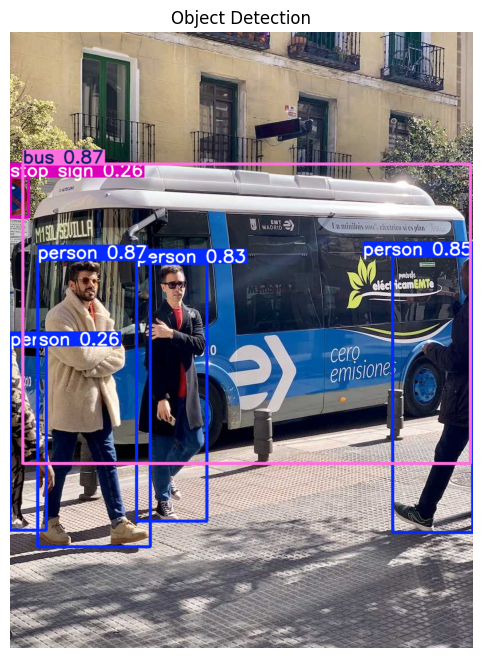
image 1/1 /Users/n0man/Code/n03an.me/notebooks/va/bus.jpg: 640x480 4 persons, 1 bus, 1 stop sign, 29.8ms
Speed: 1.6ms preprocess, 29.8ms inference, 1.0ms postprocess per image at shape (1, 3, 640, 480)
Results saved to /Users/n0man/Code/n03an.me/runs/detect/predict7
💡 Learn more at https://docs.ultralytics.com/modes/predict
set up the device (mps for macOS, cuda for NVIDIA GPUs, or cpu for CPU-only inference)
device = "mps" if torch.backends.mps.is_available() else "cuda" if torch.cuda.is_available() else "cpu"
# Run detection
def detect_objects(image_path):
    results = yolo_model(image_path)
    # Visualize results
    plt.figure(figsize=(12, 8))
    plt.imshow(results[0].plot()[:, :, ::-1])  # Convert BGR to RGB
    plt.title("Object Detection")
    plt.axis('off')
    plt.show()
# Run detection
detect_objects("images/bus.jpg")
image 1/1 /Users/n0man/Code/n03an.me/notebooks/va/images/bus.jpg: 640x480 4 persons, 1 bus, 1 stop sign, 27.2ms
Speed: 1.5ms preprocess, 27.2ms inference, 0.9ms postprocess per image at shape (1, 3, 640, 480)
Detecting Events#
Will try somethin rubbish - the function detect_event takes the results from the YOLO model and checks for the presence of specific classes (like “person”) to determine interesting event. If there are more than 3 people, it flags it as “fighting”, and if there are 5 or more, it flags it as a “crowd” situation 🤦🏻♂️🤦🏻♂️🤦🏻♂️ as rubbish as it could get but you get the point…
FIRE_CLASSES = ["fire", "smoke"]
CROWD_THRESHOLD = 5

def detect_event(yolo_results):
    people_count = 0
    fire_detected = False

    for det in yolo_results.boxes:
        cls = int(det.cls[0])
        label = yolo_model.names[cls]

        if label == "person":
            people_count += 1
        elif label in FIRE_CLASSES:
            fire_detected = True

    fighting_detected = people_count >= 3 and not fire_detected
    overcrowded = people_count >= CROWD_THRESHOLD

    return fire_detected, fighting_detected, overcrowded, people_count
we will use lightweight BLIP model Salesforce/blip-image-captioning-base (possibly the one that could run on Jetson edge devies like Jetson Xavier NX??) to generate image captions.
from transformers import BlipProcessor, BlipForConditionalGeneration
from PIL import Image as PILImage

blip_processor = BlipProcessor.from_pretrained("Salesforce/blip-image-captioning-base")
blip_model = BlipForConditionalGeneration.from_pretrained(
    "Salesforce/blip-image-captioning-base",
    device_map="auto",
    trust_remote_code=True,
    use_safetensors=True  # <--- this avoids torch.load
)

def generate_caption(frame):
    pil_image = PILImage.fromarray(cv2.cvtColor(frame, cv2.COLOR_BGR2RGB))
    inputs = blip_processor(images=pil_image, return_tensors="pt")

    inputs = {k: v.to(device) for k, v in inputs.items()}
    output = blip_model.generate(**inputs, max_new_tokens=50)
    caption = blip_processor.batch_decode(output, skip_special_tokens=True)[0]
    return caption
/Users/n0man/Code/n03an.me/.venv/lib/python3.12/site-packages/tqdm/auto.py:21: TqdmWarning: IProgress not found. Please update jupyter and ipywidgets. See https://ipywidgets.readthedocs.io/en/stable/user_install.html
  from .autonotebook import tqdm as notebook_tqdm
WARNING:torchao.kernel.intmm:Warning: Detected no triton, on systems without Triton certain kernels will not work
Using a slow image processor as `use_fast` is unset and a slow processor was saved with this model. `use_fast=True` will be the default behavior in v4.52, even if the model was saved with a slow processor. This will result in minor differences in outputs. You'll still be able to use a slow processor with `use_fast=False`.
Detecting Events and Captions…#
image_path = "images/bus.jpg"
frame = cv2.imread(image_path)
detect_objects(image_path)

results = yolo_model(frame)[0]
fire, fight, crowd, count = detect_event(results)

if fire or fight or crowd:
    print("\n[EVENT DETECTED]")
    if fire: print("🔥 Fire detected")
    if fight: print("🔴 Possible fighting detected")
    if crowd: print(f"👯👯👯👯 Overcrowding detected ({count} people)")

    caption = generate_caption(frame)
    print(f"Captions : {caption}")
else:
    print("✅ No major event detected in the image.")
image 1/1 /Users/n0man/Code/n03an.me/notebooks/va/images/bus.jpg: 640x480 4 persons, 1 bus, 1 stop sign, 34.6ms
Speed: 2.4ms preprocess, 34.6ms inference, 0.4ms postprocess per image at shape (1, 3, 640, 480)
0: 640x480 4 persons, 1 bus, 1 stop sign, 21.7ms
Speed: 1.1ms preprocess, 21.7ms inference, 0.4ms postprocess per image at shape (1, 3, 640, 480)

[EVENT DETECTED]
🔴 Possible fighting detected
Captions : a group of people walking around a bus
image_path = "images/park.jpg"
frame = cv2.imread(image_path)
detect_objects(image_path)

results = yolo_model(frame)[0]
fire, fight, crowd, count = detect_event(results)

if fire or fight or crowd:
    print("\n[EVENT DETECTED]")
    if fire: print("🔥 Fire detected")
    if fight: print("🔴 Possible fighting detected")
    if crowd: print(f"👯👯👯👯 Overcrowding detected ({count} people)")

    caption = generate_caption(frame)
    print(f"Captions : {caption}")
else:
    print("✅ No major event detected in the image.")
image 1/1 /Users/n0man/Code/n03an.me/notebooks/va/images/park.jpg: 384x640 8 persons, 1 bicycle, 1 dog, 26.7ms
Speed: 1.5ms preprocess, 26.7ms inference, 0.6ms postprocess per image at shape (1, 3, 384, 640)
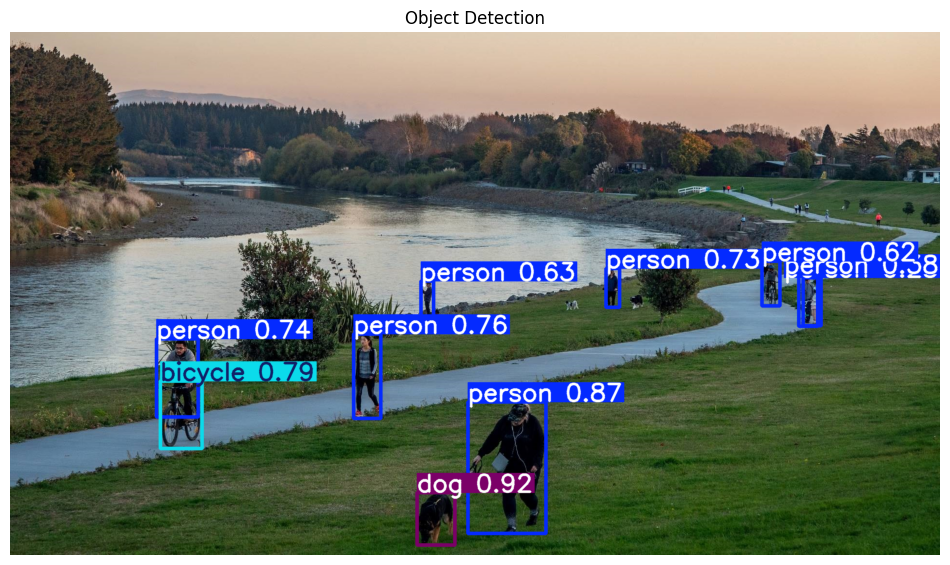
0: 384x640 8 persons, 1 bicycle, 1 dog, 17.2ms
Speed: 1.3ms preprocess, 17.2ms inference, 0.4ms postprocess per image at shape (1, 3, 384, 640)

[EVENT DETECTED]
🔴 Possible fighting detected
👯👯👯👯 Overcrowding detected (8 people)
Captions : a group of people walking along a river
image_path = "images/nemo.png"
frame = cv2.imread(image_path)
detect_objects(image_path)

objects_with_attributes = detect_and_caption_objects(frame, yolo_model)

for obj in objects_with_attributes:
    print(f"Object: {obj['type']}, Color: {obj['color']}, Attributes: {obj['attributes']}")
    print(f"Caption: {obj['caption']}\n")
image 1/1 /Users/n0man/Code/n03an.me/notebooks/va/images/nemo.png: 640x544 1 person, 1 bicycle, 27.2ms
Speed: 1.7ms preprocess, 27.2ms inference, 0.3ms postprocess per image at shape (1, 3, 640, 544)
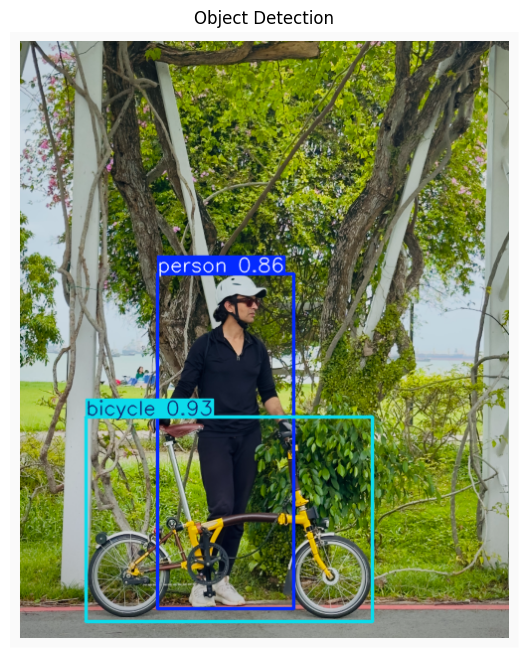
0: 640x544 1 person, 1 bicycle, 33.0ms
Speed: 1.1ms preprocess, 33.0ms inference, 0.5ms postprocess per image at shape (1, 3, 640, 544)
Object: bicycle, Color: unknown, Attributes: []
Caption: a man standing next to a yellow bike

Object: person, Color: unknown, Attributes: []
Caption: a man riding a bike on a sidewalk